
Quick Picks
If you already know your load, start here. Check both retailers because availability and pricing change.
Most homelab stacks
CyberPower CP1500PFCLCD
Gaming PC / workstation backup
APC BGM1500
Networking and compact setups
APC BE600M1
Power outages are one of the fastest ways to corrupt data, interrupt a server, or knock your entire home network offline. For homelab users, a UPS is not just a convenience – it is basic protection for your NAS, firewall, router, switch, mini PC, storage array and workstation.
For this guide, we focused on what matters most for real home lab use: wattage, VA rating, output waveform, automatic voltage regulation, outlet layout, software support, replacement battery availability, noise, size and overall value.
CyberPower CP1500PFCLCD
Best balance of pure sine wave output, capacity, features and price for most homelab users.
APC Back-UPS Pro Gaming BGM1500
A strong 1500VA option for gaming PCs, consoles, monitors and desk setups.
Tripp Lite SMART1500LCDT
A practical UPS for routers, switches, modems and office equipment – but not ideal for Active PFC PCs or servers.
APC BE600M1
Affordable protection for routers, modems, access points, switches and other low-power devices.
How We Picked These UPS Models
A good UPS for a home lab is not just about buying the biggest VA number. The watt rating, output waveform and load type matter just as much. A UPS that is fine for a router may not be appropriate for a modern gaming PC or server with an Active PFC power supply.
- Capacity: VA and watt rating for typical NAS, router, switch, mini PC and desktop loads.
- Output type: Pure sine wave vs simulated/PWM sine wave.
- Active PFC compatibility: Whether the UPS is a good match for modern PC/server power supplies.
- Runtime: Expected battery life at realistic partial loads.
- AVR: Automatic voltage regulation for brownouts and voltage fluctuation.
- Outlets: Number of battery-backed outlets and surge-only outlets.
- Software support: USB monitoring and graceful shutdown options.
- Value: Price, warranty, battery replacement and long-term ownership cost.
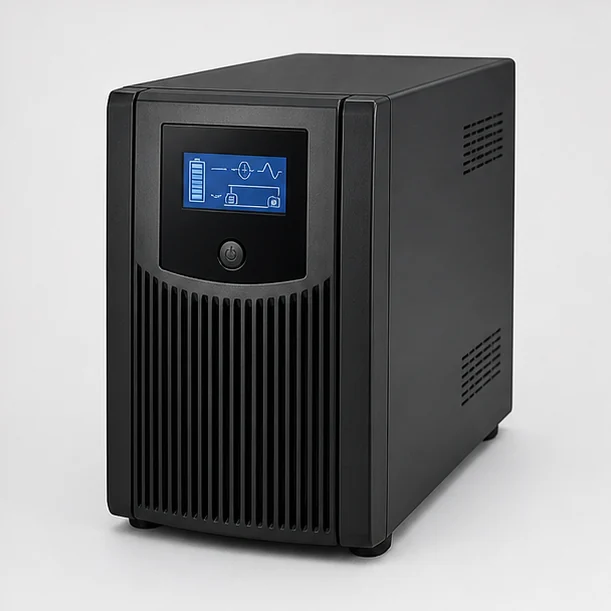
CyberPower CP1500PFCLCD PFC Sinewave
The CyberPower CP1500PFCLCD is one of the easiest UPS models to recommend for most homelab users. It combines a 1500VA / 900W rating, pure sine wave output, AVR and a useful LCD display at a reasonable price.
This is our top pick for most small and mid-size home labs. It is a strong match for setups with a NAS, mini PC server, firewall appliance, modem, router, switch and a few accessories. The pure sine wave output also makes it a safer choice for many modern power supplies with Active PFC.
Capacity: 1500VA / 900W
Output: Pure sine wave
Active PFC friendly: Yes
Best for: Homelab, NAS, mini PC servers, networking gear, desktops
AVR: Yes
Display: LCD status display
Typical use case: Protecting a full small homelab stack
Pros
- Pure sine wave output
- Good capacity for most homelab setups
- Suitable for many Active PFC power supplies
- Useful LCD display
- Automatic voltage regulation
- Strong value for a 1500VA UPS
Cons
- Larger than compact desktop UPS units
- Battery replacement may take some effort
- Software experience is functional but not perfect
- May be more than you need for only a router and modem
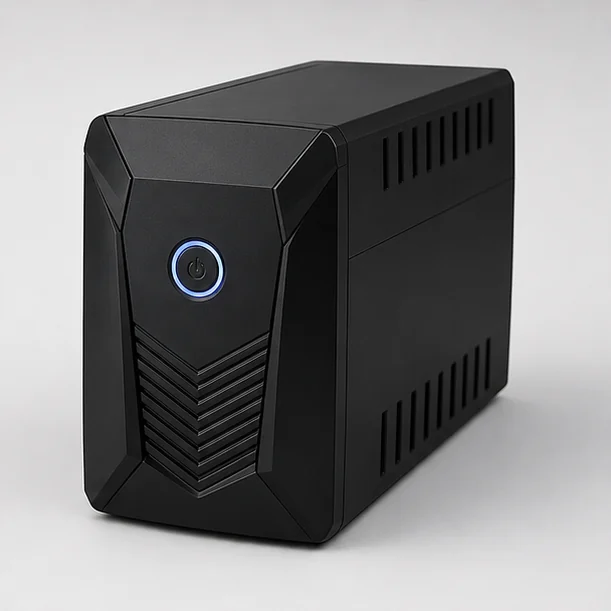
APC Back-UPS Pro Gaming BGM1500
The APC Back-UPS Pro Gaming BGM1500 is built for gaming desks, consoles and high-end PC setups where users want battery backup, surge protection and a more visual design.
This UPS makes the most sense for users who want to protect a gaming PC, monitor, console, speakers and accessories. It is less subtle than a standard office UPS, but the visual battery indicator, gaming-style design and charging features can be useful on a desk setup.
Capacity: 1500VA / 900W
Output: Pure sine wave on supported BGM1500 model listings
Active PFC friendly: Yes, if buying the pure sine wave model
Best for: Gaming PCs, consoles, monitors and desk setups
AVR: Yes
Special features: Gaming-style display, RGB lighting, USB charging
Typical use case: Protecting a high-end gaming station
Pros
- Strong capacity for gaming PCs
- Good option for consoles and peripherals
- Desk-friendly visual battery indicator
- USB charging can be convenient
- More stylish than a typical black UPS box
Cons
- Usually more expensive than standard UPS models
- RGB design is not for everyone
- Large footprint
- Not necessary for a simple router/NAS setup
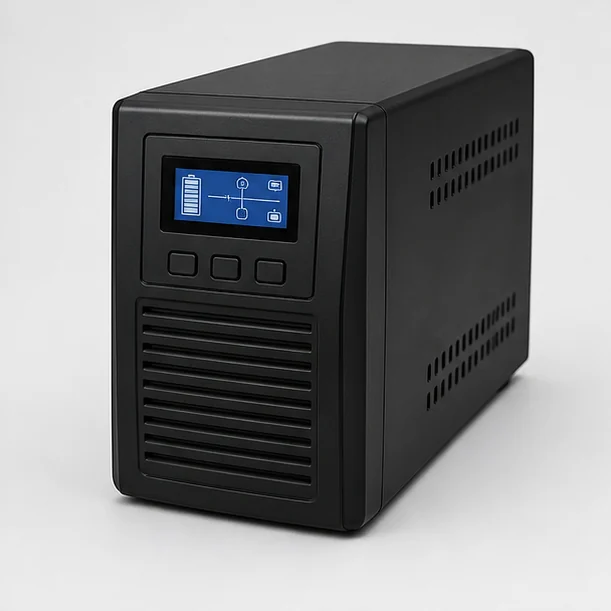
Tripp Lite SMART1500LCDT 1500VA
The Tripp Lite SMART1500LCDT is a practical line-interactive UPS for routers, switches, modems, access points and basic office equipment. However, because it uses PWM / simulated sine wave output, it is not our preferred choice for modern gaming PCs, servers or Active PFC power supplies.
This UPS can make sense if your main goal is to keep networking equipment online during short outages or brownouts. For a modem, router, switch, access point or basic office setup, the SMART1500LCDT offers useful capacity, AVR and a readable LCD display.
Capacity: 1500VA / 900W
Output: PWM / simulated sine wave
Active PFC friendly: No / not recommended
Best for: Routers, switches, modems, access points, basic office equipment
Not ideal for: Gaming PCs, servers, workstations and Active PFC power supplies
AVR: Yes
Display: LCD display
Typical use case: Keeping network gear and basic office equipment online
Pros
- Good capacity rating for network equipment
- AVR helps with brownouts and voltage fluctuations
- Useful LCD status display
- Good fit for routers, switches and modems
- Often priced competitively for a 1500VA unit
Cons
- Uses PWM / simulated sine wave output
- Not ideal for Active PFC power supplies
- Not our pick for gaming PCs or servers
- Can cause buzzing or instability with some sensitive equipment
- Bulky design
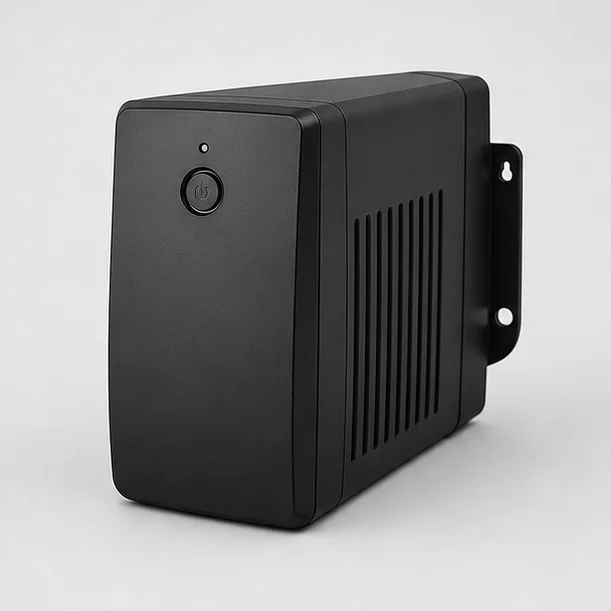
APC Back-UPS BE600M1
The APC BE600M1 is a compact and affordable UPS for keeping essential low-power equipment online, such as your modem, router, Wi-Fi access point, switch or smart home hub.
Not every setup needs a 1500VA UPS. If your goal is simply to keep the internet online during a short outage, a smaller UPS like the BE600M1 can be the smarter buy. It is especially useful for networking shelves, home offices and smart home hubs.
Capacity: 600VA / 330W
Output: Stepped approximation / simulated sine wave
Active PFC friendly: No / basic devices only
Best for: Router, modem, switch, access point, smart home hub
AVR: No
Form factor: Compact, wall-mountable design
Typical use case: Keeping internet and low-power devices online
Pros
- Affordable
- Compact and easy to place
- Great for networking gear
- Can provide long runtime for low-power devices
- Simple and reliable for basic protection
Cons
- Not suitable for high-power desktops or servers
- No LCD display
- No AVR
- Not pure sine wave
Quick Comparison
CyberPower CP1500PFCLCD
Best for: Most homelabs
Capacity: 1500VA / 900W
Output type: Pure sine wave
Active PFC friendly: Yes
AVR: Yes
Best use case: NAS, mini PC, router, switch
Price range: $$
APC BGM1500 Gaming
Best for: Gaming PCs
Capacity: 1500VA / 900W
Output type: Pure sine wave on supported model
Active PFC friendly: Yes, if pure sine wave listing
AVR: Yes
Best use case: Gaming PC, monitor, console
Price range: $$$
Tripp Lite SMART1500LCDT
Best for: Networking gear
Capacity: 1500VA / 900W
Output type: PWM / simulated sine wave
Active PFC friendly: No / not recommended
AVR: Yes
Best use case: Router, switch, modem, access point
Price range: $$
APC BE600M1
Best for: Budget networking
Capacity: 600VA / 330W
Output type: Stepped approximation / simulated sine wave
Active PFC friendly: No / basic devices only
AVR: No
Best use case: Modem, router, access point
Price range: $
How to Choose the Right UPS Size for a Homelab
The easiest way to choose a UPS is to measure your actual power draw. A NAS, mini PC, router and switch may use far less power than a gaming desktop or rack server. Once you know your real wattage, add a safety margin of about 20-30%.
For most small homelabs, a 1000VA to 1500VA UPS is a good target. For only a modem, router and access point, a smaller 600VA unit can be enough. For gaming PCs, workstations or multiple servers, pay more attention to the watt rating than the VA number.
Pure Sine Wave vs Simulated Sine Wave: Why It Matters
One of the most important UPS details is the output waveform. A pure sine wave UPS produces cleaner battery power that more closely matches normal wall power. This is usually the better choice for modern gaming PCs, workstations, servers and devices with Active PFC power supplies.
Simulated sine wave, stepped approximation and PWM sine wave UPS models can still be useful, especially for routers, modems, switches, access points and basic office equipment. However, they may not behave well with every modern PC or server power supply.
Final Verdict
For most homelab users, the CyberPower CP1500PFCLCD is the strongest overall pick because it offers pure sine wave output, a useful 1500VA / 900W rating, AVR and good value.
If you are protecting a gaming setup, the APC BGM1500 Gaming is worth considering, especially if you want a desk-friendly design and a confirmed pure sine wave model.
The Tripp Lite SMART1500LCDT is better suited for routers, switches, modems, access points and basic office gear. Because it uses PWM / simulated sine wave output, it is not our recommendation for modern gaming PCs, servers, workstations or Active PFC power supplies.
If you only need to keep your internet connection alive during short outages, the APC BE600M1 is the best budget-friendly choice.
Frequently Asked Questions
What size UPS do I need for my homelab?
Measure your actual power draw and add a 20-30% safety margin. For many small homelabs with a NAS, mini PC, router and switch, a 1000VA to 1500VA UPS is usually a good range.
Should I get a pure sine wave UPS?
Yes, if you use modern PCs, servers, workstations or power supplies with Active PFC. Pure sine wave output is generally safer for sensitive electronics and is less likely to cause buzzing, instability or shutdown during battery operation.
Is PWM sine wave the same as pure sine wave?
No. PWM sine wave is a form of approximated or simulated sine wave. It can be acceptable for basic networking equipment, but it is not the same as true pure sine wave output.
Can a simulated sine wave UPS damage my PC?
In many cases it will simply work or cause no obvious issue, but with some Active PFC power supplies it can cause buzzing, vibration, instability or sudden shutdown when the UPS switches to battery. For expensive PCs and servers, a pure sine wave UPS is the safer choice.
How long will a UPS battery last?
Runtime depends on load. A UPS may power a router for much longer than a desktop PC. UPS batteries typically need replacement every 3-5 years depending on temperature, usage and battery quality.
Do I need a UPS for a NAS?
Yes. A UPS is highly recommended for NAS devices because sudden power loss can cause interrupted writes, data corruption and filesystem problems.
What is AVR on a UPS?
AVR means Automatic Voltage Regulation. It helps correct minor voltage drops and overvoltage events without switching to battery power, which can extend battery life and improve stability.
Planning storage backup? See UPS Runtime for NAS for runtime math, clean shutdown planning, and Synology/QNAP UPS support notes.
Sources & further reading
- Uninterruptible power supply — overview and topologies
- Power factor and why active-PFC loads matter for UPS sizing
- Pure vs simulated sine wave — sine wave fundamentals
- CyberPower UPS product line (manufacturer specifications)
Specifications should be confirmed on the manufacturer’s product page before purchase.